


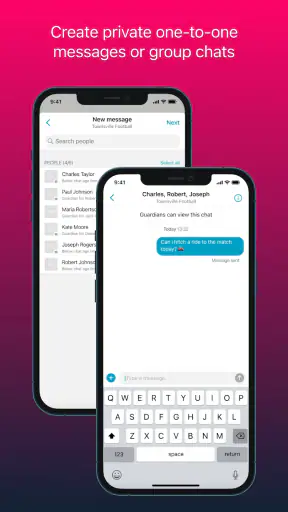
When a sports group is small, organizing it can feel harder than the actual activity. A coach needs to know who is coming, parents need timely updates, players need the right place and time, and somebody usually ends up copying the same message into several chats. I found Spond most useful as a shared coordination space for that entire routine rather than as a sports-training app. It is a free sports app from Spond AS, aimed at teams, clubs, and other groups that need one dependable place for communication and event planning.
My first impression was that its value depends less on flashy tools and more on whether everyone agrees to use it. Once a group moves away from scattered messages and starts treating the app as the main noticeboard, the daily workload becomes easier to follow. The app has a 4.8 average from around 13K ratings and more than a million installs, which fits the way it is positioned: it is built for ordinary group administration, not for elite performance analysis or live match coverage.
From a messy group chat to a workable team routine
Imagine a youth team with a training session on Wednesday, an away match on Saturday, and several families sharing transport. The starting condition is familiar: the coach knows the schedule, but the information is spread across memory, a chat thread, and perhaps a paper list. A parent asks whether the Saturday meeting time changed. Another person replies with an old detail. The coach then has to check attendance manually.
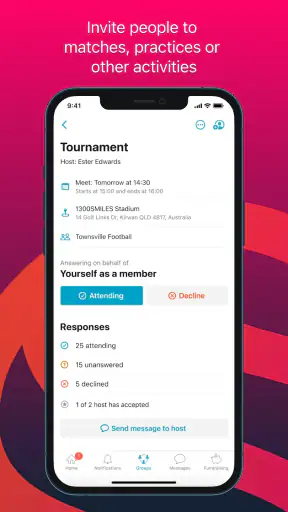
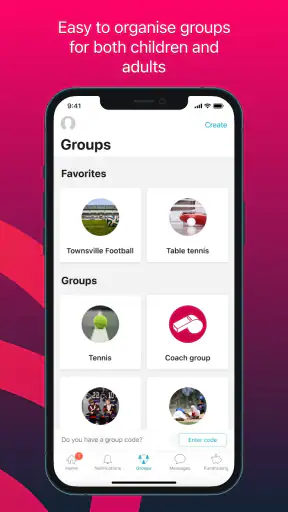
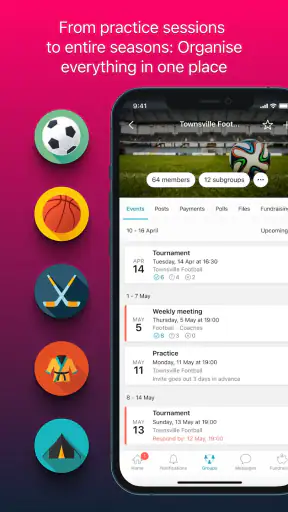
This is where I would introduce Spond. The organizer can create the group structure, add the relevant members, and use events as the practical units of the week. Instead of asking a broad question such as “Who can make it?”, the group can respond to a specific activity. That distinction matters because availability is often different for training, home fixtures, away fixtures, tournaments, and social events.
The best habit is to treat every event as a small handoff. The organizer enters the activity, members respond, and the person responsible for the next decision can work from those responses. That is more useful than a long conversation because the answer remains attached to the event instead of disappearing among unrelated messages.
Building the first event without creating extra work
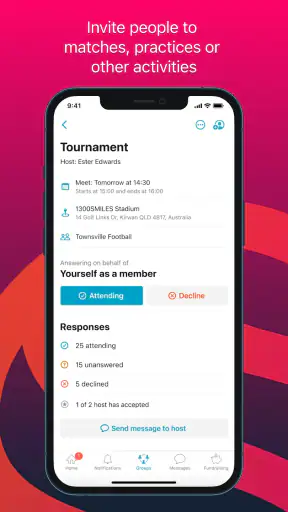
I would start with the activity that causes the most confusion, usually an away fixture or a session involving transport. Add the essential details in a way that answers the questions people actually ask: what the event is, when it happens, where the group should meet, and what response is needed. Keeping the first event focused is important. A crowded announcement can make a simple attendance request harder to understand.
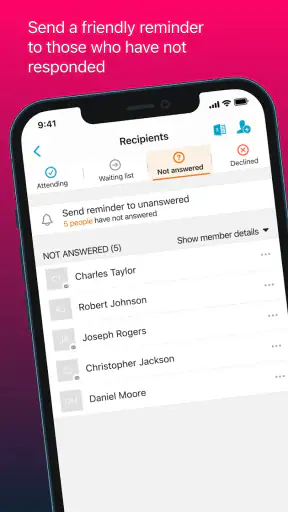
After that, I would send the invitation and give members a clear reason to respond promptly. The app cannot make people answer, but it does give the group a visible place to do so. This is one of its quiet strengths: the organizer does not need to reconstruct attendance from separate replies, reactions, and private messages.
For recurring activities, consistency becomes more valuable than cleverness. If Wednesday training is always described in a similar way, families quickly learn where to look for the time and location. That reduces the need for repeated explanations and makes the app feel like a routine tool rather than another notification source.
Turning attendance into a real decision
Attendance information is only useful when someone acts on it. In my example, the coach can review responses before deciding whether the session needs a change, while a team manager can use the same information to identify transport gaps. This separation of responsibilities is an important workflow detail. The person who creates an event does not necessarily have to be the person who handles every consequence.
A practical tip is to set a personal cutoff for checking responses. For example, I would review the list the evening before an activity, then follow up only with the people whose reply affects a concrete decision. That avoids turning the group into a stream of reminders and keeps communication focused on the next action.
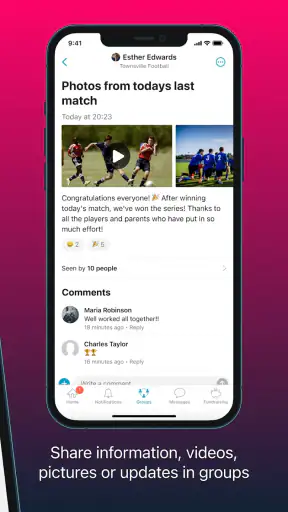
Another useful approach is to use the event conversation for details that belong to that event, rather than mixing them into general group discussion. If the meeting point changes, placing the update beside the affected activity gives late readers a better chance of finding it. This is a small workflow improvement, but it is exactly the kind of friction that makes a difference in busy family schedules.
Managing the handoffs between adults and players
Sports groups rarely have one single audience. A coach may think about equipment and attendance, a parent may think about transport and timing, and a player may only need to know where to be. A shared group can support those different handoffs, but the organizer still needs to write messages with the audience in mind.
I found that concise updates work better than trying to place every possible instruction in one announcement. A change to the meeting time should be stated plainly. A request for a driver should be separate from a reminder about kit. This is not a limitation of the app alone; it is a communication choice that becomes more visible when one space is serving several roles.
For a club with multiple teams, the value comes from keeping the right people connected to the right activities. A parent who has children in different groups needs clarity more than volume. The organizer should avoid sending broad updates when only one team needs them. When that discipline is followed, Spond feels much calmer than a general-purpose chat where every message reaches everyone.
The handoff from organizer to member is also where adoption can succeed or fail. If a coach announces that the app is the official place for schedules but continues to duplicate everything elsewhere, members have little reason to change their habits. I would make the transition gradually: publish the next important event there, explain what response is expected, and refer back to that event when questions appear in other channels.
What the workflow looks like on a busy week
On Monday, the organizer posts the week’s activities. Members check the events and respond according to their availability. By Tuesday, the coach has a clearer view of Wednesday training. On Thursday, the away-match event becomes the focus, and transport arrangements can be handled around the people who confirmed attendance. Before Saturday, the group has one current reference point instead of several competing versions of the plan.
That sequence shows why I see this as a coordination app rather than a coaching app. It does not replace the coach’s knowledge of tactics, fitness, or player development. Its job is to reduce the administrative gap between deciding that something will happen and getting the right people to the right place.
It is also a useful distinction when comparing Spond with the usual alternatives. A normal messaging app is faster for casual conversation and may already be familiar to everyone, but attendance details can become difficult to retrieve. A shared calendar is good for dates, yet it is less natural for collecting responses and discussing the practical details around a team activity. A spreadsheet can be highly flexible, but it asks someone to maintain it and is less comfortable for everyday member communication.
Spond sits between those options. It gives a group more structure than a chat while remaining more approachable than a formal club-management system. That middle position is its main appeal, especially for volunteer organizers who need order without taking on a complicated administration project.
Where the result is strongest
The clearest result appears when the group has repeated activities and several people share responsibility. A volunteer coach can publish sessions, a team manager can watch attendance, and families can refer to the same event details. The outcome is not that every task disappears; rather, fewer tasks require a private message asking someone to repeat information.
I would especially recommend it for youth teams, amateur clubs, school sports groups, and recreational communities where communication is important but nobody wants to manage a heavy database. It also makes sense for groups that include people with different levels of technical confidence, because the central idea is easy to explain: find the activity and respond to it.
The free price removes a major barrier for a trial. A club can test whether members actually adopt the workflow before deciding whether it fits its wider organization. The content rating is Everyone, and the app supports devices running Android 7.0 or later, which makes it accessible across a broad range of everyday Android phones. On Android, the current version is 4.60.0, so I would still encourage an organizer to check device compatibility before asking an entire group to switch.
One non-obvious benefit is accountability through visibility. When attendance is kept in one place, the organizer can see which part of the plan is incomplete: missing replies, missing transport, or a late change. That does not solve the problem automatically, but it helps identify the next person to contact. In a chat, the same issue can look like general noise.
Another benefit is reducing duplicated explanations. If a new member joins after an event has been created, the organizer can direct them to the relevant group information instead of reconstructing the entire background in a private conversation. The usefulness depends on how clearly the group maintains its information, but the structure gives that information somewhere to live.
Where the flow breaks down
The first weak point is participation. Spond cannot force a busy parent, player, or volunteer to open an event and respond. If half the group continues replying by text message, the organizer is back to merging two systems manually. In that situation, the app may add another inbox rather than remove one.
The second problem is over-organization. A small group with one weekly activity may find a familiar chat perfectly adequate. If everyone already responds quickly and nobody struggles to find old details, moving to a dedicated app can feel like an unnecessary step. I would not recommend Spond simply because a group is called a team; I would recommend it when scheduling and attendance are genuinely causing repeated confusion.
There is also a human cost to centralization. Once the app becomes the official source, organizers need to keep it current. An outdated event can be worse than a casual message because members assume the structured information is authoritative. The solution is a simple maintenance rule: update the event itself when the plan changes, and avoid leaving contradictory instructions in other channels.
Groups wanting deep sports analysis, player statistics, training plans, or tactical tools should look elsewhere or use Spond alongside a specialist product. Its strength is the administrative journey from event creation to confirmation, not the technical side of the sport. Likewise, a large organization with complex registration, finance, or compliance needs may require a more specialized club platform.
Small habits that make it work better
I would begin with one team rather than migrating an entire club overnight. Choose the group with the clearest scheduling problem, establish the app as the place for its next few events, and observe where members hesitate. This reveals whether the difficulty is the interface, the wording of announcements, or simply a lack of habit.
Use event names that are recognizable at a glance. “Away match” is more useful in a crowded list when it includes the opponent or purpose, while an internal abbreviation may confuse parents who are not involved in every team conversation. The goal is to make the event understandable before anyone opens it.
Keep the response request explicit. If the organizer needs attendance confirmation, say so. If the next step is arranging lifts, explain that in the event message. This is one of the most important practical insights: a structured event still needs a structured instruction. Otherwise, members may read the information but remain unsure what action is expected.
Finally, decide which channel handles urgent changes. A dedicated event is excellent for keeping the record clear, but an organizer should not assume that every member sees every update immediately. For time-sensitive situations, the group’s established emergency method may still be necessary. That is not a reason to abandon Spond; it is a reminder that coordination and urgent alerting are different jobs.
My recommendation after following the full workflow
After looking at the process from the first announcement through attendance, transport, and last-minute changes, I see Spond as a sensible choice for groups that have outgrown informal messaging but do not need enterprise-style administration. It gives organizers a repeatable path: create the activity, collect responses, hand the relevant information to the people making decisions, and keep the final details attached to the event.
I would recommend it to a volunteer coach who spends too much time answering the same scheduling questions, and to parents who want a clearer view of several weekly commitments. I would be more cautious for a tiny group that already communicates effortlessly, or for a club looking for advanced performance management rather than logistics.
The app is free, designed for Everyone, and developed by Spond AS. Its long presence since June 15, 2017, and broad adoption suggest that it has found a durable role in team communication, but the deciding factor for me is simpler: does the group agree to use one shared workflow? If the answer is yes, Spond is worth trying as the team’s practical home for events and communication. If the answer is no, even a well-structured app will struggle against scattered habits.


